XmlPageProvider
|
Product version: |
EPiServer CMS 6 / 6 R2 |
|---|---|
|
Document last saved: |
This document describes how to use the XmlPageProvider that can be downloaded for EPiServer CMS 6 and 6 R2. Any of these versions is a prerequisite for this installation. Install the XmlPageProvider as follows:
- Download and run the installation package for XmlPageProvider (ZIP file).
- Create a new EPiServer CMS project in Visual Studio.
- Add existing project to the solution.
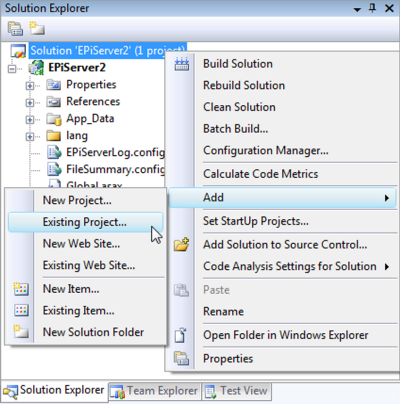
- Browse to the XmlPageProvider directory and click Open.
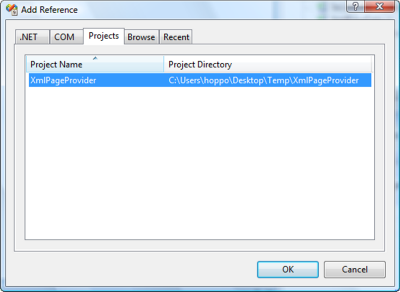
- Add a reference to your EPiServer CMS project.
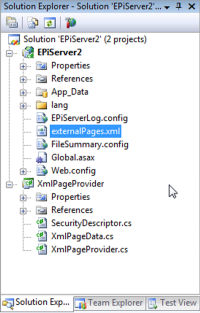
- Create a new xml file and add <pages> root node to it. It will serve as your external repository for the pages.
- Configure your page provider in web.config as described in the Page Providers tech note with the exception being that the type should be "CodeSamples.XmlPageProvider, XmlPageProvider" and the section needs a file path attribute pointing to your externalPages.xml file. Example:
<episerver xmlns="http://EPiServer.Configuration.EPiServerSection">
...
   <pageProvider>
      <providers>
         <add name="XmlPageProvider"
              type="CodeSamples.XmlPageProvider, XmlPageProvider"
              entryPoint="52"
              capabilities="Create,Edit,Delete,Search" filePath="<full path to site>\externalPages.xml"/>
      </providers>
   </pageProvider>
...
</episerver>
You should now be able to use your new external EPiServer CMS page provider.
